
There’s more choice than ever in the best vlogging cameras, and if you’re looking to start a YouTube channel or otherwise produce your own video content, you’re spoiled for choice. Almost every major manufacturer has made sure their range includes at least one lightweight camera with serious video capabilities, available at an affordable price.
The following list includes our favourite vlogging cameras available right now, with options across the price spectrum. For more on our criteria for how we picked, you can scroll to the bottom of the page for a breakdown of what makes a good vlogging camera. We’ve picked a mix of the best compact cameras and mirrorless cameras, all of which provide a comprehensive suite of advantages over a smartphone when it comes to vlogging.
What's coming up:
Best vlogging camera overall: Canon PowerShot V1
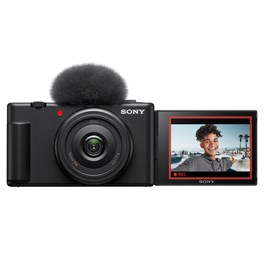
Best affordable vlogging camera: Sony Vlog ZV-1F
Best mirrorless vlogging camera: Fujifilm X-M5
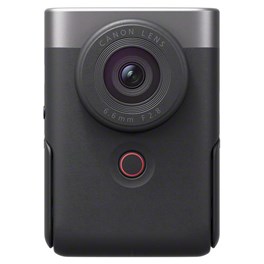
Best pocket vlogging camera: Canon PowerShot V10
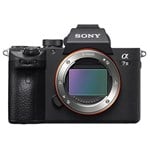
Best low-light vlogging camera: Sony A7S III
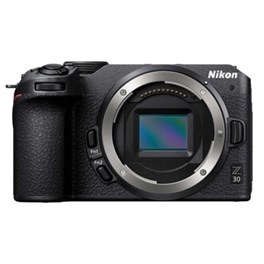
Best affordable low-light vlogging camera: Nikon Z30
Best vlogging camera overall:

|
Pros:
Cons:
|
Sensor: 22MP 1.4-inch CMOS (18.4 x 12.3mm) Lens: Built-in 16–50mm f2.8–4.5 zoom (3.1x optical) Video: 4K at 60p; Full HD at 120p; 10-bit recording with Canon Log 3 Stabilisation: Optical IS rated to 5 stops Screen: 3-inch fully articulated touchscreen |
An absolute blinder played by Canon, this all-in-one compact delivers pretty much everything vloggers could need, in a slim and portable body at a reasonable price point.
Let’s start with the sensor. It’s common for premium compact cameras to use 1-inch sensors — however, the PowerShot V1 uses a new 1.4-inch type, giving it a demonstrable advantage over comparable compacts in terms of image quality, low-light performance and dynamic range. The camera is also able to take full advantage of this sensor to produce 4K open-gate video — which means it uses the sensor’s full width. This makes for footage that is easy to crop into, which is very handy if you need to edit the same footage for different aspect ratios (e.g. a vertical copy for TikTok and a 16:9 widescreen copy for YouTube).
Elsewhere, the V1 is simply bursting with vlogger-friendly features. Its 17-52mm equivalent lens not only boasts optical stabilisation to improve the smoothness of run-and-gun footage, but also a built-in 3-stop ND filter that makes it easier to control exposure in bright daylight. A built-in fan keeps the camera cool and extends recording times — you can keep going in 4K 30p for more than two hours without the camera overheating.
If you’re building a setup around the V1, we’d advise going for the vlogging kit — for a small extra cost of £30, you get a Canon HG-100TBR tripod grip that’s worth £99 by itself, and a 128GB V60 SD card. This gives you everything you need to get started straight away.
Best affordable vlogging camera:
|
Pros:
Cons:
|
Sensor: 20.1MP 1-inch Exmor RS CMOS Lens: Fixed 20mm f2.0 ZEISS Tessar T* Video: 4K at 30p; Full HD at 120p; S-Log3 support Screen: 3-inch vari-angle touchscreen (921k dots) Audio: Built-in directional 3-capsule mic with windscreen |
For a grab-and-go vlogging camera that just about anyone can use, which comes at a price most can afford, the Sony Vlog ZV-1F fits the bill. A slimline compact that can slip easily into a pocket or small bag, the ZV-1F pairs a 1-inch sensor with an ultra-wide 20mm equivalent lens that fits plenty into the frame. Just what you want for vlogging.
Shooting 4K footage, the ZV-1F is especially good for product videography, coming with a dedicated product showcase mode and the ability to focus on objects as close as 5cm from the camera. It can pair quickly and easily with a smartphone via Bluetooth for remote triggering and quick clip sharing.
While it lacks some more advanced features of vlogging cameras, like optical stabilisation and phase-detection autofocus (it relies on a slower contrast-detection system), the Sony ZV-1F still crams a lot of functionality into its small body, and if you’re looking for a starter vlogging camera that won’t lighten your wallet too much, it’s an excellent choice.
Best mirrorless vlogging camera:

|
Pros:
Cons:
|
Sensor: 15.2MP 1-inch back-illuminated CMOS Lens: Fixed 19mm equivalent f2.8 Video: 4K at 30p; Full HD at 60p; digital IS Audio: Stereo mics with noise reduction Design: Built-in kickstand; compact vertical body |
Canon went back to the drawing board for its latest PowerShot vlogging camera, and the result is the clever V10, which at first glance doesn’t look much like a camera at all. Once you start digging into it, however, the design really makes sense; it fits perfectly in one hand, and its wide-angle lens makes it perfect for self-shooting. The design is much easier to hold in this manner than a conventionally designed camera, and while you don’t get the flexibility of interchangeable lenses, you do get a much more convenient and portable vlogging setup.
Footage quality from the PowerShot V10 is great, going up to 4K 30p. However, it’s in its design that this camera truly excels. We love the inclusion of the little built-in stand for quickly propping the camera up on a desk — no need to buy a tripod! — and we appreciate that while the built-in mics offer respectable audio quality, there’s also the option to plug in an external mic.
Best low-light vlogging camera:

|
Pros:
Cons:
|
Sensor: 12MP full-frame BSI-CMOS Video: 4K at 120p; 10-bit 4:2:2 internal; 15-stop dynamic range Autofocus: 759-point phase detection with real-time tracking Stabilisation: 5-axis IBIS rated to 5.5 stops Viewfinder: 9.44M-dot OLED EVF with 0.91x magnification |
The first Sony A7S camera debuted in 2014, and it was a revelation. Anyone who was following the industry at the time probably remembers the feeling of seeing that initial video sample released by Sony, showing just how capable its incredible sensor was in low light, transforming a night-time beach scene from basically invisible to looking like full daylight at ISO 409,600. Witchcraft.
These days, we’re at the Sony A7s III, and it’s the finest distillation of the formula yet. The combination of an Exmor R 12MP full-frame BSI sensor (nice and low-resolution for video) and the upgraded BIONZ XR processor results in a camera that captures spellbinding images in stunning 4K quality. It also has effective 5-axis stabilisation, and a sophisticated Fast Hybrid Autofocus system that works exceptionally well in low light.
Best affordable low-light vlogging camera:
|
Pros:
Cons:
|
Sensor: 20.9 MP APS-C CMOS Video: 4K at 30p; Full HD at 120p; no crop Autofocus: 209-point hybrid AF with eye detection Screen: 3-inch fully articulated touchscreen Connectivity: USB-C, Wi-Fi, Bluetooth; webcam support |
The Nikon Z30 camera is designed for content creators to upgrade to a user-friendly 4K setup. With powerful features that are easy to use, it's perfectly suited for use at home, in the studio, or on the move.
Shooting at 4K 30fps means you’ll get crisp visuals for your viewers and you can even capture smooth slow-motion with 120fps shots at 1080p to add some creative flair. The large CMOS sensor and wide ISO range help to eliminate complicated lighting setups as the camera can handle low-light conditions without taking a hit on video quality.
Whilst the Z30 does feature a built-in stereo microphone that has a wind reduction mode, the lack of a headphone socket means you can’t monitor audio levels first-hand. It feels like a minor inconvenience though, given that you’re getting such a capable camera that will drastically improve your vlogging content.
How to choose the best vlogging camera
What are the key components of a vlogging camera? There’s a lot we could talk about here, as all sorts of different camera specs affect how capable a camera will be for vlogging, but to cut to the chase, we’ve boiled it down to key elements.
Weight: If you’re an outdoorsy kind of vlogger, someone doing run-and-gun filmmaking in the streets or on other locations, having a camera that won’t weigh you down and become a pain to carry is critical. Remember also that if you buy an interchangeable-lens camera, you’ll have to factor in the weight of the lenses you use.
Flip-around screen: For filming yourself, as many vloggers do, a flip-around screen is critical for being able to check your framing and focus as you shoot. This is an absolutely obligatory feature in any new vlogging camera that comes out these days, but isn’t always included on older ones, so do check.
Video resolution/frame rate: The megapixel count of a vlogging camera isn’t particularly important — if anything you want it nice and low. What you do want to check is the maximum video resolution it can shoot. Full HD (1080p) has been standard for long enough that anything lower is going to look markedly inferior, so this is the minimum standard you should be looking at.
However, 4K is better if you can get it. Not only is the video better quality and better for displaying on 4K monitors, you can also crop into the footage to give yourself more options in editing. Higher resolutions like 6K and 8K are certainly nice if you can get them, but as a vlogger it’s unlikely you need them.
Frame rate: is the other thing to mention – that is, how many frames per second a camera can shoot. Ideally the minimum frame rate you want for smooth-looking footage is 30, expressed as 30p or 30fps. Having 60p is nice if you can get it, but not necessarily essential. Frame rates higher than that (120p, 240p and beyond) are great too as they allow you to get super-slow-motion footage for creative effects – though be aware this often requires a cut in resolution.
Audio options: Pristine, clear audio is absolutely critical in making video for an audience — nothing feels more amateurish than a video with fuzzy, badly recorded sound. While modern vlogging cameras do have better built-in mic setups, ideally you want a camera that has the capacity to connect an external microphone (commonly via a 3.5mm input jack). This will make a marked difference to the overall quality of your content — see our guide to the best microphones. A headphone socket for monitoring levels can be handy as well.
FAQs
What is a vlogging camera?
Vlogging cameras are designed for creating vlogs - video blogs. These cameras typically have features that make them suitable for recording video content, such as high-quality video recording, image stabilisation, and good autofocus capabilities.
What should I look for in a vlogging camera?
Some important features to consider when choosing a vlogging camera include video quality, image stabilisation, autofocus performance, low-light performance, audio quality, and ease of use.
What is the best vlogging camera for beginners?
Some good options for beginner vloggers include the Canon PowerShot G7 X Mark III, Sony ZV-1, and the Panasonic Lumix G85.
Should I use a DSLR camera or a mirrorless camera for vlogging?
Both DSLR and mirrorless cameras can be used for vlogging, but mirrorless cameras are generally better suited for video recording due to their faster autofocus and better image stabilisation capabilities. However, there are many other options such as compact cameras, action cameras and even your smartphone.
Do I need a camera with a flip screen for vlogging?
While a flip screen can be helpful for vlogging, it is not strictly necessary. Some vloggers prefer to use an external monitor or rely on the camera's autofocus features to ensure that they are in focus and in the frame.
What is the difference between optical and digital zoom?
Optical zoom uses the camera lens to zoom in on a subject, while digital zoom crops the image to make it appear closer. Optical zoom is generally preferred as it results in higher-quality images and is not subject to the same loss of detail that can occur with digital zoom.
How do we decide?
Our in-house photography specialists, store staff, and industry partners work together to review our buying guides and advice articles. We also monitor emerging trends and listen closely to customer feedback, ensuring our recommendations stay current and relevant to what photographers and filmmakers are actually looking for.
By carefully curating the products we recommend, our guides are designed to offer clear, trustworthy advice that helps customers choose the right kit with confidence.
If you would like further advice, our contact centre team are here to help. You can also reach us via email or social media. And remember, if you purchase based on our recommendations, your order is covered by our full returns policy.
Explore our range of photo and video equipment

The Wex Blog

Sign up for our newsletter today!
- Subscribe for exclusive discounts and special offers
- Receive our monthly content roundups
- Get the latest news and know-how from our experts